AI Product Developer
& Rapid MVP Builder.
I turn messy ideas into working MVPs fast.
I shape early ideas into working prototypes, then test the flow, refine the product, and make it clearer through AI tools, product thinking, QA, and fast iteration.
I like working where product thinking, design, AI tools, and building meet.
My work is focused on turning early ideas into working prototypes: shaping the concept, building the first version, testing the flow, and improving the product based on real feedback.
I'm especially interested in AI products that feel useful, human, and practical, not just impressive demos.
Before focusing on AI product building, I worked in operations and internal tooling, which shaped how I build: close to real workflows, clear handoffs, practical systems, and the people who actually use them.
ScoutFlow
scoutflow.cc ↗ScoutFlow is a calm AI-powered clarity engine for early-stage founders. It turns a messy startup idea into a structured clarity brief, the single riskiest assumption to test, and a focused validation action plan, so founders know what to test before they build too much.
It's designed for early-stage founders, indie hackers, solopreneurs, and hackathon teams who have ideas but need clearer direction, better assumptions, and one practical next step.
A conversational clarity interface. Founders type in a messy, half-formed idea and work with the AI to shape it into a structured brief and a first validation roadmap. The useful output comes from the back-and-forth, not a single one-shot generated report.
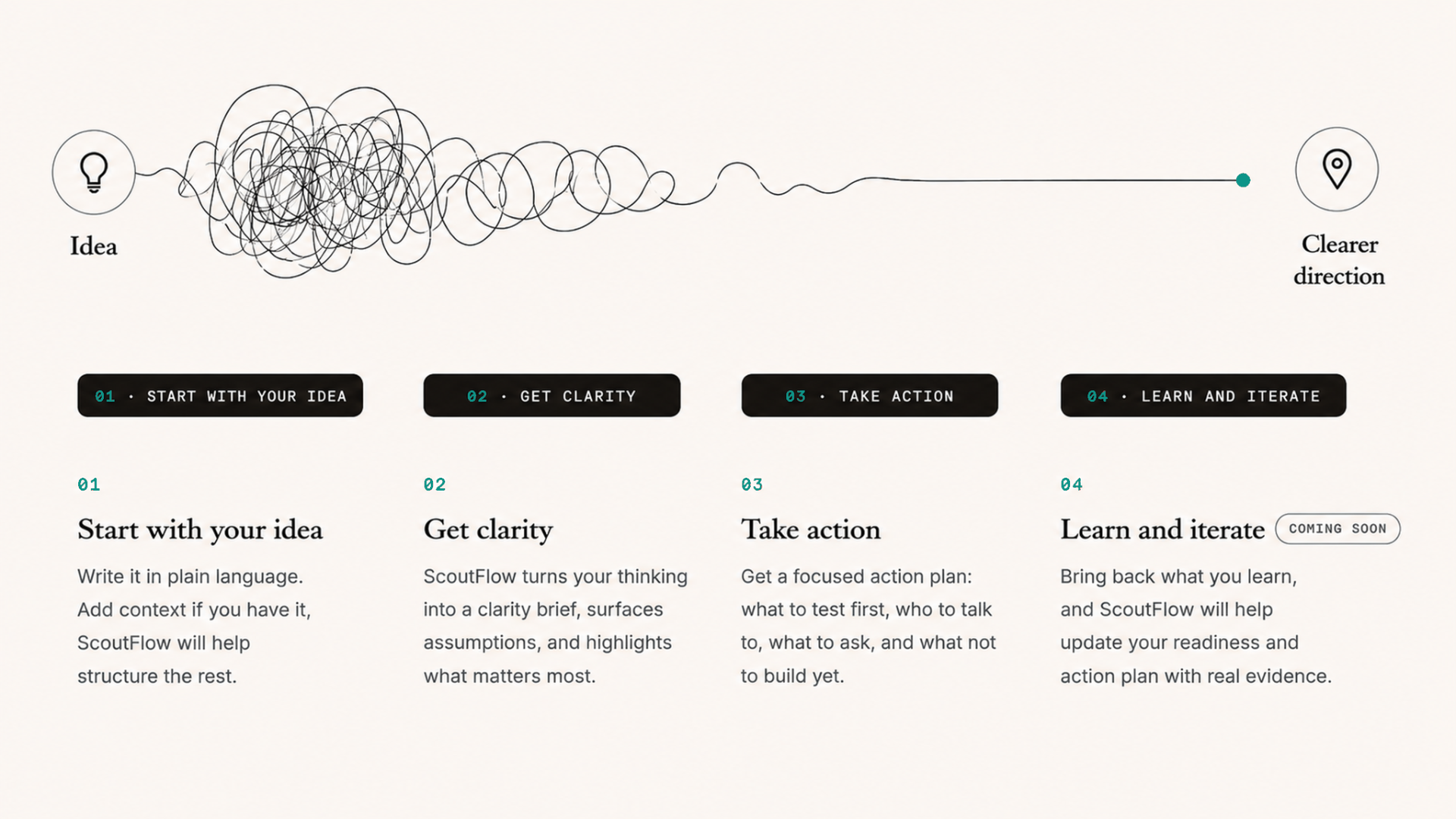
ScoutFlow started from a simple product problem: early founders don't usually lack ideas. They have too many ideas, too early, with too little clarity about what actually needs testing.
The product is built around the belief that building often feels safer than customer discovery, so founders overbuild before they know which assumption matters most. ScoutFlow reduces that noise by turning a raw idea into a clearer brief, surfacing the riskiest assumption, and producing a concrete validation plan: who to talk to, what to ask, what to test first, and what not to build yet.
The AI workflow uses structured generation rather than open-ended chat. It generates a clarity brief first, then a concrete 7-day validation plan. It deliberately avoids fake certainty: no numeric validation scores, no "good idea / bad idea" verdicts, and no invented statistics.
It also includes trust and quality systems: prompt guardrails, editable brief approval, quality checks, validation logic, and privacy-aware analytics that avoid storing raw idea text in telemetry.
ScoutFlow was built with Lovable as a rapid MVP and shaped by an external research workflow using Strawberry Browser. Before building, I used Strawberry research agents to validate whether the problem was real, map the competitive landscape, and identify the strongest initial user segment. The research covered founder communities, startup essays, and adjacent tools, showing repeated pain around idea noise, build-first reflex, customer discovery avoidance, generic AI advice, and not knowing what to test first.
The product direction came from that research: ScoutFlow should reduce noise, not add more inputs, and produce one structured first test instead of another generic report. Early word-of-mouth alpha with 53 public try sessions.
ScoutFlow was a two-person build. I owned the product end to end: product logic, user journey, roadmap, implementation phases, and the Lovable build. My collaborator contributed to overall project direction, feedback loops, distribution ideas, and future improvements.
ViiBy
viiby.app ↗ViiBy is a mood-based discovery app for Copenhagen that helps people find cafés, restaurants, bars, and activities based on how they feel, not just what category they search for.
Instead of scrolling through generic listings, ViiBy starts with a vibe: cozy, energetic, aesthetic, focused, active, or elevated. From there it matches users with curated Copenhagen venues, lets them save places to wishlists, create diary memories, share recommendations, and use community signals like Pulse and Vibe Checks to decide where to go next.
A social layer runs through it: users add each other through Circle, discover places their trusted people recommend, and share wishlists or diary experiences as part of the local discovery flow.
ViiBy started from a simple product insight: people often don't choose places by category first. They choose based on mood, context, energy, and the kind of experience they want. Traditional discovery tools make users filter through cuisine, price, location, and ratings, but they rarely answer the more human question: "where fits how I feel right now?"
The product flips that flow. Instead of search-first discovery, ViiBy uses vibe-first discovery: pick a mood, see matching places, check the community pulse, then save, remember, share, or go. The experience combines curated local venue data, a vibe taxonomy, selected-vibe matching, place detail modals, wishlists, diary memories, Circle connections, Vibe Checks, and VibeMiles as an engagement layer.
The social layer matters because ViiBy is not only about picking places from a list. Users add trusted people through Circle, see where their community recommends, create diary memories from real visits, and build or share wishlists for future plans. That turns discovery into something more personal, social, and community-driven.
ViiBy also shows product iteration and scope discipline. I initially scoped VibeMiles around venue discounts, then refocused it on engagement rewards for actions that strengthen discovery: saving places, diary memories, Vibe Checks, wishlists, and Circle activity. This kept the product centered on discovery and community participation instead of premature monetization.
The project also includes the operational side of product building: venue data management, admin tooling, analytics, user moderation, VibeMiles support, an early-access flow, and launch planning. The live site can be shared publicly, while access to the full product is handled through the Request early access flow.
ViiBy is a solo build. The idea, product logic, and product development are all mine. What shaped it beyond that was continuous input from real users testing it as I built. Their feedback, ideas, and reactions fed directly into product decisions, so the experience was refined in real time against how people actually wanted to discover places.
LUMI
LUMI is a personal AI companion that lives on the desktop. She sits alongside the day as it actually happens and remembers the work: the decisions, the promises, the half-finished thoughts. When you need something back, you just ask. Everything she remembers stays in a local vault on your device.
LUMI today is a working desktop app in private beta on Windows. She follows the day, builds a working memory of it, opens the morning with what matters, keeps a story of each day on a calendar, and answers questions like "what did I promise Rebecca" from her own record, checking her notes before she answers. Everything she remembers lives in a local vault on the device. The demo film above is unscripted and shows the shipping build, with a fictional persona and a month of fabricated work so no one's private life is on screen.
The core idea is simple: AI support should not stay hidden inside a chat box. LUMI explores what happens when a personal assistant has presence, voice, memory/privacy rules, safe actions, and a physical expression layer on the desk.
A conversational AI companion driven by text or voice. I can give LUMI a request, and she turns natural language into real actions like reminders, focus sessions, nudges, or quiet mode. The important part is the trust layer: not every interaction is generative, and actions need clear routing, confirmation, and safe boundaries.
LUMI started from a product question: what if an AI assistant felt less like a chatbot and more like a gentle desk companion that could help with focus, reminders, task friction, and visible state? The goal was not a generic assistant; it was to design a companion that knows when to speak, when to stay quiet, when to ask for confirmation, when to respect DND, and how to make its state understandable at a glance.
The software side is a full Companion Hub with voice interaction, Talk-to-LUMI flows, reminders, to-dos, focus support, quick nudges, DND/Quiet/Shush behavior, user preferences, deterministic safe action routing, and a Hardware Lab for device testing. A key product decision was that not every AI interaction should be generative: creating reminders, completing tasks, turning on DND, or triggering hardware state need deterministic routing, confirmation, and trust boundaries.
An earlier hardware phase gave LUMI physical presence. Using a Waveshare ESP32-S3 Touch AMOLED board, the firmware rendered a warm, minimal animated face with approved expressions: happy, talking, listening, thinking, sleepy, reminder, DND, warning, shush. The firmware was intentionally simple and reliable: the app decided what LUMI was doing, while the hardware acted as a physical expression layer controlled over USB serial.
The bridge between software and hardware ran through a developer-facing Hardware Lab using Web Serial. Manual expression control was validated end-to-end from browser to USB serial to physical face. The State Bridge mapped real app states (idle, listening, speaking, DND, reminder, shush) into hardware expressions with ack tracking, latency display, dedupe, and manual override protection, built and mock-tested. That physical face remains part of where LUMI can go next.
LUMI is strongest as a portfolio project because it shows cross-layer product thinking: companion UX, voice behavior, safe AI actions, memory/privacy planning, hardware state design, serial protocol thinking, physical QA, and honest validation boundaries. It's not just an AI chatbot; it's an AI companion system that grew from a desk prototype into a working desktop product.
Some of the product thinking came from Neura, an earlier personal command-center prototype focused on tasks, reminders, memory, WhatsApp capture, and structured actions. LUMI takes the strongest parts of that direction and makes them more embodied: less dashboard-only, more companion-like, with voice, visible state, and a physical presence on the desk.
LUMI is a solo build that started from my own need. I wanted focus and reminder support that felt calmer and more present than another notification, so I designed and built every layer myself: the companion UX and product logic, the safe-action routing, the firmware, and the hardware bridge. Building for a problem I actually live with kept the scope honest and the decisions grounded in real daily use rather than a hypothetical user.
PigeonCalypse
PigeonCalypse is a chaotic 4-player couch brawler where humans fight over a stolen glowing AI core while an AI-powered pigeon swarm sabotages the arena. The story is simple and ridiculous: the pigeons got hold of the AI, got smarter, and now every match is a frantic fight for control, survival, and bragging rights.
The first playable minigame, Core Clash, is a fast 60-second party loop: grab the core, hold it longest, dodge the pigeons, and try not to get punished for being ahead. It shipped as a playable hackathon demo with a custom arcade controller, and now continues as a larger party-game concept built one minigame at a time.
gameplay video to be uploaded · 18/07/2026
PigeonCalypse started from a creative challenge: could I turn a funny, chaotic story into a playable party-game prototype fast, using AI-native tools, Summer Engine, and a custom physical controller? The goal was not just to make a mechanic work, but to make the game feel like something people would want to gather around, laugh at, and replay.
The project combines game design, storytelling, visual direction, AI-assisted asset generation, and hands-on prototyping. I shaped the world, the game loop, the minigame structure, the visual tone, and the design document, while the technical build focused on fast movement, readable chaos, bot/pigeon behavior, scoring, game feel, and controller integration.
The prototype shipped as a playable 60-second loop for the event and drew real player interest: people wanted to keep playing and asked for more minigames, turning it from a one-off hackathon build into a longer-term party-game direction. The next layer is polish: a stronger core model, cloud-themed arena, a distinct pigeon cast, trailer/demo material, and a full party-flow shell inspired by accessible couch games like Chimparty and Frantics.
ONE MORAL
ONE MORAL turns true stories into one clear, memorable life lesson. Each video follows a simple arc: story → hidden pattern → one moral, using real history and real lives as the vehicle, not the destination.
The aim is to leave the viewer with one thought-provoking, emotionally resonant insight they can carry into their own life. Across two content lanes, the governed pipeline produced 29 locked scripts and 20 finished videos, the three strongest shown here as demo evidence.


ONE MORAL is a portfolio project showing how I build governed AI-assisted editorial workflows. It started from a specific product problem: AI can generate reflective short-form content quickly, but without structure it often becomes fake-deep, repetitive, preachy, or weakly grounded.
The project explores how editorial quality can be engineered through workflow design instead of prompt-tinkering alone. Content moves through source discipline, subject screening, script gates, review layers, depth testing, correction loops, and final human judgment before anything is approved. That human gate is not a rubber stamp: it is where the calls that cannot be reduced to a rule get made: whether a piece is genuinely meaningful or just well-formed, and where the boundary sits between what the system can decide and what a person must decide.
Across the examples produced, the correction loop improved more than individual drafts. Recurring corrections were absorbed over cycles, so later drafts stopped repeating earlier mistakes. The workflow itself changed when testing exposed weaknesses: weak review steps were collapsed, and over-corrections were reversed when they removed lines that carried real human truth. The point was not to defend a perfect-looking system diagram, but to improve the system under pressure.
Tooling-wise, Claude handled doctrine, structure, critique, and script refinement; Claude in Chrome tested image gap-filling inside the video editor; and Revid handled short-form video generation and packaging. The project is paused rather than finished, so it lives here as a documented system and demo reel.
NEURA
Neura is an ADHD-aware personal AI productivity system designed as an external executive-function assistant. It brought tasks, reminders, notes, ideas, projects, calendar planning, work tracking, personal memory, focus support, and WhatsApp-based capture into one connected dashboard.
The goal was to reduce friction between scattered thoughts and real action. Instead of forcing the user to organize everything manually, Neura tested a gentler flow: capture first, interpret later, then turn messy input into clear next steps through AI interpretation, structured commands, review layers, and energy-aware UX.
A merged prototype exploring how AI could become a personal command center rather than another fragmented productivity tool. It was built around the idea that productivity support should start with capture, not organization: connecting tasks, reminders, notes, ideas, projects, work sessions, personal memory, calendar support, and WhatsApp interaction into one workspace.
One of the strongest patterns was WhatsApp-based text-to-command. The user could message Neura naturally, and the system interpreted it into structured actions: adding a task, creating a reminder, listing today's priorities, completing a task, snoozing a reminder, creating a project, saving a preference, or starting a focus flow.
This reduced the risk of the AI hallucinating actions and made the assistant feel like a reliable command layer rather than a loose chatbot. The prototype also tested universal capture, inbox review, structured preference memory, energy-aware task planning, ADHD-friendly focus modes, work/time tracking, personal memory, knowledge files, and a lesson-learning system based on user corrections.
Later, parts of the thinking merged into the LUMI direction: softer AI support, memory, reminders, focus, trust, and companion-like interaction.
Neura started as an early personal AI command-center prototype. I paused the standalone direction and folded its strongest thinking into LUMI.